Skip to content

The 2025 Guide to JS Build Tools

The 2025 Guide to JS Build Tools

The 2025 Guide to JS Build Tools

In 2025, we're seeing the largest number of JavaScript build tools being actively maintained and used in history. Over the past few years, we've seen the trend of many build tools being rewritten or forked to use a faster and more efficient language like Rust and Go. In the last year, new companies have emerged, even with venture capital funding, with the goal of working on specific sets of build tools. Void Zero is one such recent example.

With so many build tools around, it can be difficult to get your head around and understand which one is for what. Hopefully, with this blog post, things will become a bit clearer. But first, let's explain some concepts.

Concepts

When it comes to build tools, there is no one-size-fits-all solution. Each tool typically focuses on one or two primary features, and often relies on other tools as dependencies to accomplish more. While it might be difficult to explain here all of the possible functionalities a build tool might have, we've attempted to explain some of the most common ones so that you can easily understand how tools compare.

Minification

The concept of minification has been in the JavaScript ecosystem for a long time, and not without reason. JavaScript is typically delivered from the server to the user's browser through a network whose speed can vary. Thus, there was a need very early in the web development era to compress the source code as much as possible while still making it executable by the browser. This is done through the process of minification, which removes unnecessary whitespace, comments, and uses shorter variable names, reducing the total size of the file.

This is what an unminified JavaScript looks like:

function greetUser(name) {
    if (name) {
        console.log("Hello, " + name + "!");
    } else {
        console.log("Hello, stranger!");
    }
}

function addNumbers(a, b) {
    return a + b;
}

console.log(greetUser("Alice"));
console.log(addNumbers(5, 7));

This is the same file, minified:

function greetUser(e){e?console.log("Hello, "+e+"!"):console.log("Hello, stranger!")}function addNumbers(e,o){return e+o}console.log(greetUser("Alice")),console.log(addNumbers(5,7));

Closely related to minimizing is the concept of source maps, which goes hand in hand with minimizing - source maps are essentially mappings between the minified file and the original source code. Why is that needed? Well, primarily for debugging minified code. Without source maps, understanding errors in minified code is nearly impossible because variable names are shortened, and all formatting is removed. With source maps, browser developer tools can help you debug minified code.

Tree-Shaking

Tree-shaking was the next-level upgrade from minification that became possible when ES modules were introduced into the JavaScript language. While a minified file is smaller than the original source code, it can still get quite large for larger apps, especially if it contains parts that are effectively not used. Tree shaking helps eliminate this by performing a static analysis of all your code, building a dependency graph of the modules and how they relate to each other, which allows the bundler to determine which exports are used and which are not. Once unused exports are found, the build tool will remove them entirely. This is also called dead code elimination.

Bundling

Development in JavaScript and TypeScript rarely involves a single file. Typically, we're talking about tens or hundreds of files, each containing a specific part of the application. If we were to deliver all those files to the browser, we would overwhelm both the browser and the network with many small requests. Bundling is the process of combining multiple JS/TS files (and often other assets like CSS, images, etc.) into one or more larger files.

A bundler will typically start with an entry file and then recursively include every module or file that the entry file depends on, before outputting one or more files containing all the necessary code to deliver to the browser. As you might expect, a bundler will typically also involve minification and tree-shaking, as explained previously, in the process to deliver only the minimum amount of code necessary for the app to function.

Transpiling

Once TypeScript arrived on the scene, it became necessary to translate it to JavaScript, as browsers did not natively understand TypeScript. Generally speaking, the purpose of a transpiler is to transform one language into another. In the JavaScript ecosystem, it's most often used to transpile TypeScript code to JavaScript, optionally targeting a specific version of JavaScript that's supported by older browsers. However, it can also be used to transpile newer JavaScript to older versions. For example, arrow functions, which are specified in ES6, are converted into regular function declarations if the target language is ES5.

Additionally, a transpiler can also be used by modern frameworks such as React to transpile JSX syntax (used in React) into plain JavaScript. Typically, with transpilers, the goal is to maintain similar abstractions in the target code. For example, transpiling TypeScript into JavaScript might preserve constructs like loops, conditionals, or function declarations that look natural in both languages.

Compiling

While a transpiler's purpose is to transform from one language to another without or with little optimization, the purpose of a compiler is to perform more extensive transformations and optimizations, or translate code from a high-level programming language into a lower-level one such as bytecode. The focus here is on optimizing for performance or resource efficiency. Unlike transpiling, compiling will often transform abstractions so that they suit the low-level representation, which can then run faster.

Hot-Module Reloading (HMR)

Hot-module reloading (HMR) is an important feature of modern build tools that drastically improves the developer experience while developing apps. In the early days of the web, whenever you'd make a change in your source code, you would need to hit that refresh button on the browser to see the change. This would become quite tedious over time, especially because with a full-page reload, you lose all the application state, such as the state of form inputs or other UI components.

With HMR, we can update modules in real-time without requiring a full-page reload, speeding up the feedback loop for any changes made by developers. Not only that, but the full application state is typically preserved, making it easier to test and iterate on code.

Development Server

When developing web applications, you need to have a locally running development server set up on something like http://localhost:3000. A development server typically serves unminified code to the browser, allowing you to easily debug your application. Additionally, a development server will typically have hot module replacement (HMR) so that you can see the results on the browser as you are developing your application.

The Tools

Now that you understand the most important features of build tools, let's take a closer look at some of the popular tools available. This is by no means a complete list, as there have been many build tools in the past that were effective and popular at the time. However, here we will focus on those used by the current popular frameworks. In the table below, you can see an overview of all the tools we'll cover, along with the features they primarily focus on and those they support secondarily or through plugins.
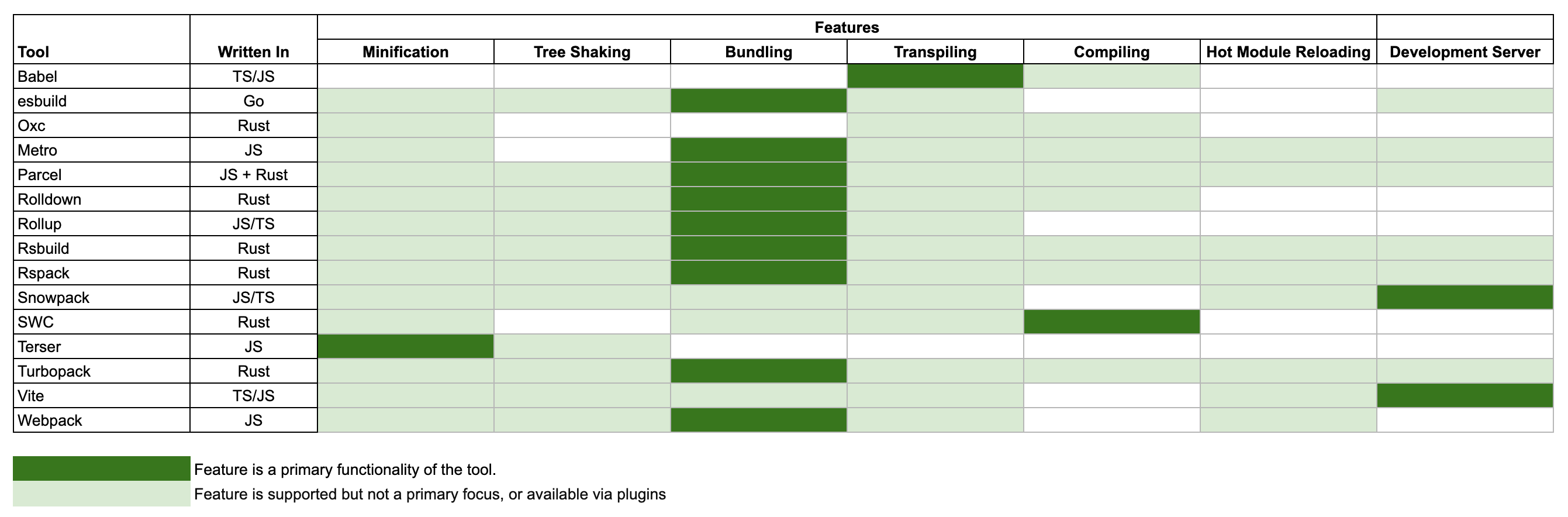
Overview of the tools

The tools are presented in alphabetical order below.

Babel

Babel, which celebrated its 10th anniversary since its initial release last year, is primarily a JavaScript transpiler used to convert modern JavaScript (ES6+) into backward-compatible JavaScript code that can run on older JavaScript engines. Traditionally, developers have used it to take advantage of the newer features of the JavaScript language without worrying about whether their code would run on older browsers.

esbuild

esbuild, created by Evan Wallace, the co-founder and former CTO of Figma, is primarily a bundler that advertises itself as being one of the fastest bundlers in the market. Unlike all the other tools on this list, esbuild is written in Go. When it was first released, it was unusual for a JavaScript bundler to be written in a language other than JavaScript. However, this choice has provided significant performance benefits.

esbuild supports ESM and CommonJS modules, as well as CSS, TypeScript, and JSX. Unlike traditional bundlers, esbuild creates a separate bundle for each entry point file. Nowadays, it is used by tools like Vite and frameworks such as Angular.

Metro

Unlike other build tools mentioned here, which are mostly web-focused, Metro's primary focus is React Native. It has been specifically optimized for bundling, transforming, and serving JavaScript and assets for React Native apps. Internally, it utilizes Babel as part of its transformation process. Metro is sponsored by Meta and actively maintained by the Meta team.

Oxc

The JavaScript Oxidation Compiler, or Oxc, is a collection of Rust-based tools. Although it is referred to as a compiler, it is essentially a toolchain that includes a parser, linter, formatter, transpiler, minifier, and resolver. Oxc is sponsored by Void Zero and is set to become the backbone of other Void Zero tools, like Vite.

Parcel

Feature-wise, Parcel covers a lot of ground (no pun intended). Largely created by Devon Govett, it is designed as a zero-configuration build tool that supports bundling, minification, tree-shaking, transpiling, compiling, HMR, and a development server. It can utilize all the necessary types of assets you will need, from JavaScript to HTML, CSS, and images. The core part of it is mostly written in JavaScript, with a CSS transformer written in Rust, whereas it delegates the JavaScript compilation to a SWC. Likewise, it also has a large collection of community-maintained plugins. Overall, it is a good tool for quick development without requiring extensive configuration.

Rolldown

Rolldown is the future bundler for Vite, written in Rust and built on top of Oxc, currently leveraging its parser and resolver. Inspired by Rollup (hence the name), it will provide Rollup-compatible APIs and plugin interface, but it will be more similar to esbuild in scope. Currently, it is still in heavy development and it is not ready for production, but we should definitely be hearing more about this bundler in 2025 and beyond.

Rollup

Rollup is the current bundler for Vite. Originally created by Rich Harris, the creator of Svelte, Rollup is slowly becoming a veteran (speaking in JavaScript years) compared to other build tools here. When it originally launched, it introduced novel ideas focused on ES modules and tree-shaking, at the time when Webpack as its competitor was becoming too complex due to its extensive feature set - Rollup promised a simpler way with a straightforward configuration process that is easy to understand. Rolldown, mentioned previously, is hoped to become a replacement for Rollup at some point.

Rsbuild

Rsbuild is a high-performance build tool written in Rust and built on top of Rspack. Feature-wise, it has many similiarities with Vite. Both Rsbuild and Rspack are sponsored by the Web Infrastructure Team at ByteDance, which is a division of ByteDance, the parent company of TikTok. Rsbuild is built as a high-level tool on top of Rspack that has many additional features that Rspack itself doesn't provide, such as a better development server, image compression, and type checking.

Rspack

Rspack, as the name suggests, is a Rust-based alternative to Webpack. It offers a Webpack-compatible API, which is helpful if you are familiar with setting up Webpack configurations. However, if you are not, it might have a steep learning curve. To address this, the same team that built Rspack also developed Rsbuild, which helps you achieve a lot with out-of-the-box configuration.

Under the hood, Rspack uses SWC for compiling and transpiling. Feature-wise, it’s quite robust. It includes built-in support for TypeScript, JSX, Sass, Less, CSS modules, Wasm, and more, as well as features like module federation, PostCSS, Lightning CSS, and others.

Snowpack

Snowpack was created around the same time as Vite, with both aiming to address similar needs in modern web development. Their primary focus was on faster build times and leveraging ES modules. Both Snowpack and Vite introduced a novel idea at the time: instead of bundling files while running a local development server, like traditional bundlers, they served the app unbundled. Each file was built only once and then cached indefinitely. When a file changed, only that specific file was rebuilt. For production builds, Snowpack relied on external bundlers such as Webpack, Rollup, or esbuild.

Unfortunately, Snowpack is a tool you’re likely to hear less and less about in the future. It is no longer actively developed, and Vite has become the recommended alternative.

SWC

SWC, which stands for Speedy Web Compiler, can be used for both compilation and bundling (with the help of SWCpack), although compilation is its primary feature. And it really is speedy, thanks to being written in Rust, as are many other tools on this list. Primarily advertised as an alternative to Babel, its SWC is roughly 20x faster than Babel on a single thread. SWC compiles TypeScript to JavaScript, JSX to JavaScript, and more. It is used by tools such as Parcel and Rspack and by frameworks such as Next.js, which are used for transpiling and minification.

SWCpack is the bundling part of SWC. However, active development within the SWC ecosystem is not currently a priority. The main author of SWC now works for Turbopack by Vercel, and the documentation states that SWCpack is presently not in active development.

Terser

Terser has the smallest scope compared to other tools from this list, but considering that it's used in many of those tools, it's worth separating it into its own section. Terser's primary role is minification. It is the successor to the older UglifyJS, but with better performance and ES6+ support.

Vite

Vite is a somewhat of a special beast. It's primarily a development server, but calling it just that would be an understatement, as it combines the features of a fast development server with modern build capabilities.

Vite shines in different ways depending on how it's used. During development, it provides a fast server that doesn't bundle code like traditional bundlers (e.g., Webpack). Instead, it uses native ES modules, serving them directly to the browser. Since the code isn't bundled, Vite also delivers fast HMR, so any updates you make are nearly instant.

Vite uses two bundlers under the hood. During development, it uses esbuild, which also allows it to act as a TypeScript transpiler. For each file you work on, it creates a file for the browser, allowing an easy separation between files which helps HMR. For production, it uses Rollup, which generates a single file for the browser. However, Rollup is not as fast as esbuild, so production builds can be a bit slower than you might expect. (This is why Rollup is being rewritten in Rust as Rolldown. Once complete, you'll have the same bundler for both development and production.)

Traditionally, Vite has been used for client-side apps, but with the new Environment API released in Vite 6.0, it bridges the gap between client-side and server-rendered apps.

Turbopack

Turbopack is a bundler, written in Rust by the creators of webpack and Next.js at Vercel. The idea behind Turbopack was to do a complete rewrite of Webpack from scratch and try to keep a Webpack compatible API as much as possible. This is not an easy feat, and this task is still not over.

The enormous popularity of Next.js is also helping Turbopack gain traction in the developer community. Right now, Turbopack is being used as an opt-in feature in Next.js's dev server. Production builds are not yet supported but are planned for future releases.

Webpack

And finally we arrive at Webpack, the legend among bundlers which has had a dominant position as the primary bundler for a long time. Despite the fact that there are so many alternatives to Webpack now (as we've seen in this blog post), it is still widely used, and some modern frameworks such as Next.js still have it as a default bundler. Initially released back in 2012, its development is still going strong. Its primary features are bundling, code splitting, and HMR, but other features are available as well thanks to its popular plugin system. Configuring Webpack has traditionally been challenging, and since it's written in JavaScript rather than a lower-level language like Rust, its performance lags behind compared to newer tools. As a result, many developers are gradually moving away from it.

Conclusion

With so many build tools in today's JavaScript ecosystem, many of which are similarly named, it's easy to get lost. Hopefully, this blog post was a useful overview of the tools that are most likely to continue being relevant in 2025. Although, with the speed of development, it may as well be that we will be seeing a completely different picture in 2026!

This Dot is a consultancy dedicated to guiding companies through their modernization and digital transformation journeys. Specializing in replatforming, modernizing, and launching new initiatives, we stand out by taking true ownership of your engineering projects.

We love helping teams with projects that have missed their deadlines or helping keep your strategic digital initiatives on course. Check out our case studies and our clients that trust us with their engineering.

You might also like

“Music and code have a lot in common,” freeCodeCamp’s Jessica Wilkins on what the tech community is doing right to onboard new software engineers cover image

“Music and code have a lot in common,” freeCodeCamp’s Jessica Wilkins on what the tech community is doing right to onboard new software engineers

Before she was a software developer at freeCodeCamp, Jessica Wilkins was a classically trained clarinetist performing across the country. Her days were filled with rehearsals, concerts, and teaching, and she hadn’t considered a tech career until the world changed in 2020. > “When the pandemic hit, most of my gigs were canceled,” she says. “I suddenly had time on my hands and an idea for a site I wanted to build.” That site, a tribute to Black musicians in classical and jazz music, turned into much more than a personal project. It opened the door to a whole new career where her creative instincts and curiosity could thrive just as much as they had in music. Now at freeCodeCamp, Jessica maintains and develops the very JavaScript curriculum that has helped her and millions of developers around the world. We spoke with Jessica about her advice for JavaScript learners, why musicians make great developers, and how inclusive communities are helping more women thrive in tech. Jessica’s Top 3 JavaScript Skill Picks for 2025 If you ask Jessica what it takes to succeed as a JavaScript developer in 2025, she won’t point you straight to the newest library or trend. Instead, she lists three skills that sound simple, but take real time to build: > “Learning how to ask questions and research when you get stuck. Learning how to read error messages. And having a strong foundation in the fundamentals” She says those skills don’t come from shortcuts or shiny tools. They come from building. > “Start with small projects and keep building,” she says. “Books like You Don’t Know JS help you understand the theory, but experience comes from writing and shipping code. You learn a lot by doing.” And don’t forget the people around you. > “Meetups and conferences are amazing,” she adds. “You’ll pick up things faster, get feedback, and make friends who are learning alongside you.” Why So Many Musicians End Up in Tech A musical past like Jessica’s isn’t unheard of in the JavaScript industry. In fact, she’s noticed a surprising number of musicians making the leap into software. > “I think it’s because music and code have a lot in common,” she says. “They both require creativity, pattern recognition, problem-solving… and you can really get into flow when you’re deep in either one.” That crossover between artistry and logic feels like home to people who’ve lived in both worlds. What the Tech Community Is Getting Right Jessica has seen both the challenges and the wins when it comes to supporting women in tech. > “There’s still a lot of toxicity in some corners,” she says. “But the communities that are doing it right—like Women Who Code, Women in Tech, and Virtual Coffee—create safe, supportive spaces to grow and share experiences.” She believes those spaces aren’t just helpful, but they’re essential. > “Having a network makes a huge difference, especially early in your career.” What’s Next for Jessica Wilkins? With a catalog of published articles, open-source projects under her belt, and a growing audience of devs following her journey, Jessica is just getting started. She’s still writing. Still mentoring. Still building. And still proving that creativity doesn’t stop at the orchestra pit—it just finds a new stage. Follow Jessica Wilkins on X and Linkedin to keep up with her work in tech, her musical roots, and whatever she’s building next. Sticker illustration by Jacob Ashley....

Incremental Hydration in Angular cover image

Incremental Hydration in Angular

Incremental Hydration in Angular Some time ago, I wrote a post about SSR finally becoming a first-class citizen in Angular. It turns out that the Angular team really treats SSR as a priority, and they have been working tirelessly to make SSR even better. As the previous blog post mentioned, full-page hydration was launched in Angular 16 and made stable in Angular 17, providing a great way to improve your Core Web Vitals. Another feature aimed to help you improve your INP and other Core Web Vitals was introduced in Angular 17: deferrable views. Using the @defer blocks allows you to reduce the initial bundle size and defer the loading of heavy components based on certain triggers, such as the section entering the viewport. Then, in September 2024, the smart folks at Angular figured out that they could build upon those two features, allowing you to mark parts of your application to be server-rendered dehydrated and then hydrate them incrementally when needed - hence incremental hydration. I’m sure you know what hydration is. In short, the server sends fully formed HTML to the client, ensuring that the user sees meaningful content as quickly as possible and once JavaScript is loaded on the client side, the framework will reconcile the rendered DOM with component logic, event handlers, and state - effectively hydrating the server-rendered content. But what exactly does "dehydrated" mean, you might ask? Here's what will happen when you mark a part of your application to be incrementally hydrated: 1. Server-Side Rendering (SSR): The content marked for incremental hydration is rendered on the server. 2. Skipped During Client-Side Bootstrapping: The dehydrated content is not initially hydrated or bootstrapped on the client, reducing initial load time. 3. Dehydrated State: The code for the dehydrated components is excluded from the initial client-side bundle, optimizing performance. 4. Hydration Triggers: The application listens for specified hydration conditions (e.g., on interaction, on viewport), defined with a hydrate trigger in the @defer block. 5. On-Demand Hydration: Once the hydration conditions are met, Angular downloads the necessary code and hydrates the components, allowing them to become interactive without layout shifts. How to Use Incremental Hydration Thanks to Mark Thompson, who recently hosted a feature showcase on incremental hydration, we can show some code. The first step is to enable incremental hydration in your Angular application's appConfig using the provideClientHydration provider function: ` Then, you can mark the components you want to be incrementally hydrated using the @defer block with a hydrate trigger: ` And that's it! You now have a component that will be server-rendered dehydrated and hydrated incrementally when it becomes visible to the user. But what if you want to hydrate the component on interaction or some other trigger? Or maybe you don't want to hydrate the component at all? The same triggers already supported in @defer blocks are available for hydration: - idle: Hydrate once the browser reaches an idle state. - viewport: Hydrate once the component enters the viewport. - interaction: Hydrate once the user interacts with the component through click or keydown triggers. - hover: Hydrate once the user hovers over the component. - immediate: Hydrate immediately when the component is rendered. - timer: Hydrate after a specified time delay. - when: Hydrate when a provided conditional expression is met. And on top of that, there's a new trigger available for hydration: - never: When used, the component will remain static and not hydrated. The never trigger is handy when you want to exclude a component from hydration altogether, making it a completely static part of the page. Personally, I'm very excited about this feature and can't wait to try it out. How about you?...

Integrating Next.js with New Relic cover image

Integrating Next.js with New Relic

Integrating Next.js with New Relic When it comes to application monitoring, New Relic is genuinely one of the veterans in the market. Founded in 2008, it offers a large set of tools designed for developers to help them analyze application performance, troubleshoot problems, and gain insight into user behavior through real-time analytics. We needed to integrate New Relic's application monitoring with a modern Next.js app built on top of the app router. This blog post will explain your options if you want to do the same in your project. Please keep in mind that depending on when you read this blog post, there may be some advances in how New Relic works with Next.js. You can always refer to the official New Relic website for up-to-date documentation. The approach is also different, depending on whether you use Vercel's managed Next.js hosting (or any other provider that is lambda-based) or self-host Next.js on an alternative provider such as Fly.io. We'll start with the typical steps you need to do for both ways of deploying; then we'll continue with the self-hosted option, which uses a complete set of features from New Relic, and finish with Vercel where we recommend the OpenTelemetry integration for now. Common Prerequisite Steps First, let's install the necessary packages. These were built by New Relic and are needed whether you self-host your Next.js app or host it on Vercel. ` The next thing you'll want to do is define your app name. The name will be different depending on the environment the app is running in, such as a local environment, staging, or production. This will ensure that the data you send to New Relic is always tagged with a proper app name and will not be mixed between environments. An environment-changing parameter, such as the app name, should always be included in an environment variable. In your local environment, that would be in .env.local, while staging/production or any other hosted environments would be configured in the provider. ` To get full coverage with New Relic, in Next.js, we need to cover the parts running on the client (in the browser) and on the server. The server-running part is different on Vercel's managed hosting, where all of the logic is executed within lambdas, and self-hosting variants, where the server logic is executed on a Node.js server. The client part is configured by going to the New Relic dashboard and clicking "Add Data" / "Browser Monitoring". Choose "place a JavaScript snippet in frontend code," name it the same name you used in the environment variable above, click "Continue" to the last step, and copy the part between the script tags: ` Then paste it to a variable inside any module of your code. For example, this is how we did it: ` Now, create a component that will use this script and put it to Next's Script component. Then you can use the component in your root layout: ` There are several things to note here. First, we need to set a unique ID for the Script component for Next.js to track and optimize the script. We also need to set the strategy to beforeInteractive so that the New Relic script is added to the document’s head element. Finally, we use some environment helper variables. IS_PRODUCTION and IS_STAGING are just helper variables that read the environment variables to determine if we are in a local environment, staging, or production. Now you can create an app router error page and report any uncaught errors to New Relic: ` With this in place, the client part is covered, and you should start seeing data in the New Relic dashboard under "All Entities" / "Browser Applications." Let's now focus on the server part, with both a self-hosted option and Vercel. Self-Hosting Next.js If you self-host Next.js, It will typically run through a Node server (containerized or not), meaning you can fully utilize New Relic's APM agent. Start by adding this to the Next.js config (next.config.js) to mark the newrelic package as external, otherwise you would not be able to import it. ` The next step that New Relic recommends is to copy the newrelic.js file from the newrelic library to the root of the folder. However, we want to keep our project root clean, and we'll store the file in o11y/newrelic.js (“o11y” is an abbreviation for observability). This will also demonstrate the configuration needed to make this possible. This file, by default, will look something like this. ` As you can see, some environment variables are involved, such as NEW_RELIC_APP_NAME and NEW_RELIC_LICENSE_KEY. These environment variables will be needed when the New Relic agent starts up. The trick here is that the agent doesn't start up with your app but *earlier* by preloading the library through another environment variable, NODE_OPTIONS. On the server, that would be done by modifying the start script to this: ` This ensures the agent is preloaded before starting the app, and the rest of the environment variables (such as NEW_RELIC_APP_NAME and NEW_RELIC_LICENSE_KEY) should already exist. Making sure this works in local development is not that easy due to different stages of loading environment variables. The environment variables from .env.local are loaded by the framework, which is too late for the New Relic agent (which is preloaded by the Node process). However, it is possible with a trick. First, add the following new environment variables to .env.local: ` (We have not mentioned NEW_RELIC_HOME so far, but the New Relic agent implicitly uses it to locate the newrelic.js file. We need to specify that since we moved it to the o11y folder.) Next, install the nodenv package. ` The nodenv package provides a cross-platform way of preloading environment variables before we start the Node process. If we provide it with the .env.local file, this means all of the environment variables from that file will be available to the New Relic agent! Change the scripts in package.json: ` And that's it. If you now start the local server using the dev command, nodenv will make environment variables available to the Node process. The Node process will preload the New Relic agent (because we have NODE_OPTIONS in .local.env), the agent will read all the environment variables needed by newrelic.js, and everything will work as expected. The first thing you might notice is the creation of the newrelic_agent.log. This is just a log file by the agent which you can use to troubleshoot if the agent is not working correctly. You can safely add this file to .gitignore. From this point on, the server-side part of the app can utilize New Relic's API (such as noticeError and recordLogEvent) and the agent will automatically be recording transactions made through the server. The data should be visible in the New Relic dashboard, under "All Entities" / "Services - APM". This is how you would log an error in your server action, for example: ` The full source of this type of integration is available on StackBlitz. Using Vercel's Managed Next.js Hosting Using the New Relic APM agent on Vercel is currently not possible, as the server part of Next.js runs within lambdas, and not within a typical Node server as in the self-hosted option. In the future, this may be possible. At the moment, the only way to integrate Vercel and New Relic is by using the Vercel OpenTelemetry collector, which is only available for some plans. The first step is to enable the integration in Vercel's dashboard and then install the following packages: ` Create an instrumentation.ts file in the root of your project and add the following code: ` In the the Next.js config (next.config.js), add: ` The OpenTelemetry integration does not work locally, hence the above conditional check. With the above configuration, the collected OpenTelemetry data should be visible in the New Relic dashboard under "All Entities" / "Services - OpenTelemetry". Optionally, Logging via New Relic API When using the Vercel OpenTelemetry integration, there is no easy way to submit custom logs to New Relic. New Relic offers a logging API, however, so to send custom logs from your backend, you could use a logger such as Winston, which has good library support for custom transports, such as the one for New Relic. Install the following packages: ` Then create a logger.ts file with the following code: ` NewRelicTransport utilizes the New Relic logging API to send application logs. Now you can use the serverLogger in your backend code, from server components to server actions. Conclusion As you can see, various options exist for integrating New Relic with the modern, app-router-based Next.js. Sadly, at the time of writing, no one-size-fits-all solution works equally for all hosting options, as Vercel's managed Next.js platform is still relatively young, and so is the app router in Next.js. If you liked this blog post, feel free to browse our other Next.js blog posts for more tips and tricks in other areas of the Next.js ecosystem....

The simplicity of deploying an MCP server on Vercel cover image

The simplicity of deploying an MCP server on Vercel

The current Model Context Protocol (MCP) spec is shifting developers toward lightweight, stateless servers that serve as tool providers for LLM agents. These MCP servers communicate over HTTP, with OAuth handled clientside. Vercel’s infrastructure makes it easy to iterate quickly and ship agentic AI tools without overhead. Example of Lightweight MCP Server Design At This Dot Labs, we built an MCP server that leverages the DocuSign Navigator API. The tools, like `get_agreements`, make a request to the DocuSign API to fetch data and then respond in an LLM-friendly way. ` Before the MCP can request anything, it needs to guide the client on how to kick off OAuth. This involves providing some MCP spec metadata API endpoints that include necessary information about where to obtain authorization tokens and what resources it can access. By understanding these details, the client can seamlessly initiate the OAuth process, ensuring secure and efficient data access. The Oauth flow begins when the user's LLM client makes a request without a valid auth token. In this case they’ll get a 401 response from our server with a WWW-Authenticate header, and then the client will leverage the metadata we exposed to discover the authorization server. Next, the OAuth flow kicks off directly with Docusign as directed by the metadata. Once the client has the token, it passes it in the Authorization header for tool requests to the API. ` This minimal set of API routes enables me to fetch Docusign Navigator data using natural language in my agent chat interface. Deployment Options I deployed this MCP server two different ways: as a Fastify backend and then by Vercel functions. Seeing how simple my Fastify MCP server was, and not really having a plan for deployment yet, I was eager to rewrite it for Vercel. The case for Vercel: * My own familiarity with Next.js API deployment * Fit for architecture * The extremely simple deployment process * Deploy previews (the eternal Vercel customer conversion feature, IMO) Previews of unfamiliar territory Did you know that the MCP spec doesn’t “just work” for use as ChatGPT tooling? Neither did I, and I had to experiment to prove out requirements that I was unfamiliar with. Part of moving fast for me was just deploying Vercel previews right out of the CLI so I could test my API as a Connector in ChatGPT. This was a great workflow for me, and invaluable for the team in code review. Stuff I’m Not Worried About Vercel’s mcp-handler package made setup effortless by abstracting away some of the complexity of implementing the MCP server. It gives you a drop-in way to define tools, setup https-streaming, and handle Oauth. By building on Vercel’s ecosystem, I can focus entirely on shipping my product without worrying about deployment, scaling, or server management. Everything just works. ` A Brief Case for MCP on Next.js Building an API without Next.js on Vercel is straightforward. Though, I’d be happy deploying this as a Next.js app, with the frontend features serving as the documentation, or the tools being a part of your website's agentic capabilities. Overall, this lowers the barrier to building any MCP you want for yourself, and I think that’s cool. Conclusion I'll avoid quoting Vercel documentation in this post. AI tooling is a critical component of this natural language UI, and we just want to ship. I declare Vercel is excellent for stateless MCP servers served over http....

Let's innovate together!

We're ready to be your trusted technical partners in your digital innovation journey.

Whether it's modernization or custom software solutions, our team of experts can guide you through best practices and how to build scalable, performant software that lasts.

Prefer email? hi@thisdot.co